Mastering Digital Texture: A Comprehensive Guide to the White Egg Brush
In the expansive world of digital art and graphic design, the difference between a flat, lifeless composition and a vibrant, tactile masterpiece often lies in the subtle details. Textures play a pivotal role in establishing mood, depth, and realism. Among the myriad of tools available to modern creators, specialized brushes serve as the bridge between technical precision and organic expression. One such tool that has garnered attention for its unique textural capabilities is the White Egg Brush. This article explores the utility, application, and creative potential of this specific digital asset, offering insights for professionals, hobbyists, and educators alike.
Understanding the Digital Asset Structure
Before diving into artistic applications, it is crucial to understand what you are actually acquiring when you download a specialized brush set. Unlike physical tools, digital brushes are software-specific files that dictate how a program interprets cursor movement, pressure sensitivity, and opacity. The White Egg Brush typically arrives in a compressed format, designed for easy distribution and installation.
When you access the download, you will encounter a ZIP file containing the essential components. Inside, you will find either a .brushes file or a .swatches file, depending on the software ecosystem it targets. It is important to note that this particular package is streamlined for efficiency, containing exactly 1 Brush. This singular focus allows artists to master one specific texture rather than sifting through hundreds of unused presets. The simplicity of the file structure ensures compatibility with major industry-standard software, making it a versatile addition to any digital toolkit.
The Aesthetic Characteristics of the White Egg Texture
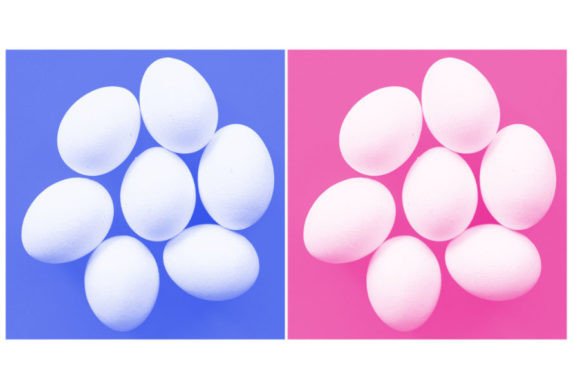
The name "White Egg" might seem abstract at first, but it refers to the specific visual quality the brush imparts. In nature, an eggshell is not perfectly smooth; it possesses a microscopic granularity, a matte finish, and a subtle irregularity that catches light in a diffuse manner. Translating this to digital media requires a brush that avoids the sterile perfection of default software tools.
The White Egg Brush is engineered to replicate this organic imperfection. It provides a soft, granular texture that mimics the feel of high-quality paper or natural stone. When applied, it does not lay down color in a solid, uniform block. Instead, it introduces a gentle noise and variation in density. This characteristic is invaluable for artists seeking to break up digital harshness. The brush excels in creating surfaces that feel touched by hand, offering a tactile quality that engages the viewer on a subconscious level.
Key Visual Properties
- Granularity: The brush introduces fine, sand-like particles that prevent colors from appearing flat.
- Matte Finish: It reduces the artificial gloss often associated with digital renders, creating a more natural light absorption.
- Soft Edges: The transition between the brush stroke and the background is gradual, allowing for seamless blending.
- Pressure Sensitivity: The single brush included in the set is optimized to respond dynamically to stylus pressure, varying opacity and flow naturally.
Practical Applications Across Creative Disciplines
The versatility of the White Egg Brush extends beyond traditional digital painting. Its unique textural properties make it a valuable asset for various creative professions. Understanding where and how to apply this tool can significantly enhance workflow efficiency and final output quality.
Digital Painting and Illustration
For concept artists and illustrators, achieving a traditional media look is often a primary goal. The White Egg Brush serves as an excellent base layer tool. By applying broad strokes with this brush, artists can establish a textured canvas effect before beginning detailed work. This technique helps in grounding the illustration, making subsequent layers of color and detail feel more integrated. It is particularly effective for skin tones, where the subtle grain can mimic the natural texture of human skin, avoiding the plastic-like appearance common in beginner digital portraits.
Graphic Design and Branding
In the realm of graphic design, minimalism and texture often go hand in hand. Designers working on branding materials, packaging, or editorial layouts can use the White Egg Brush to add depth to backgrounds. A plain white or off-white background can appear stark and uninviting on screens. Applying a subtle layer of this brush texture adds sophistication and warmth. It is also useful for creating distressed effects on typography or logos, giving them a vintage or handcrafted appeal without requiring complex masking techniques.
Photography and Photo Manipulation
Photographers and retouchers frequently seek ways to unify composite images. When combining elements from different sources, lighting and texture mismatches can break the illusion of reality. The White Egg Brush can be used on a new overlay layer to apply a consistent grain across the entire composition. This "glues" the elements together, ensuring that a foreground subject and a background landscape share the same textual language. It is an efficient method for adding a film-like quality to digital photographs.
Installation and Workflow Integration
Integrating the White Egg Brush into your existing workflow is a straightforward process, thanks to the standardized file formats provided in the ZIP archive. Whether you are using Adobe Photoshop, Procreate, Clip Studio Paint, or Affinity Designer, the installation steps are generally similar.
- Extract the Files: Begin by unzipping the downloaded archive. Locate the
.brushesor.swatchesfile inside. - Import into Software: Open your preferred digital art application. Navigate to the brush panel or library settings. Most programs offer an "Import" or "Load Brushes" option.
- Select the File: Browse to the location where you extracted the ZIP content and select the single brush file.
- Verify Installation: Check your brush list to ensure the White Egg Brush appears. It may be located in a "Recently Added" folder or a custom category.
Once installed, it is advisable to create a custom preset or save the brush settings if your software allows. This ensures that the brush remains easily accessible for future projects. Because the set contains only 1 Brush, it does not clutter your library, making it easy to locate and deploy quickly during intense creative sessions.
Technical Considerations for Optimal Results
To fully leverage the potential of the White Egg Brush, users must consider several technical factors. Digital brushes are not magic wands; their effectiveness depends on how they are manipulated within the software environment.
Layer Blending Modes: The impact of the brush changes dramatically depending on the blending mode of the layer it is applied to. Using "Multiply" can deepen shadows with texture, while "Overlay" or "Soft Light" can introduce subtle grain to mid-tones and highlights. Experimenting with these modes is essential for achieving the desired aesthetic.
Opacity and Flow: While the brush is designed to respond to pressure, manually adjusting opacity and flow settings can yield different results. Lowering the opacity allows for building up texture gradually, creating a more nuanced effect. High flow settings produce bolder, more immediate textural marks, suitable for expressive backgrounds.
Resolution and Canvas Size: The visibility of the texture depends on the resolution of your canvas. On high-resolution prints, the granular details of the White Egg Brush will be crisp and distinct. On lower-resolution web graphics, the effect may appear softer. Artists should adjust the brush size relative to their canvas dimensions to maintain consistency in texture scale.
The Value of Specialized Tools in a Generalist World
In an era where software suites come bundled with thousands of default brushes, one might question the value of downloading a single, specialized brush. However, the curation of tools is a hallmark of professional practice. Generalist brushes are designed to be adequate for many tasks but exceptional for none. The White Egg Brush, by contrast, is tuned for a specific purpose: delivering organic, matte granularity.
For educators, this tool serves as an excellent example of how specific textures influence perception. Students can learn to identify the difference between a flat digital fill and a textured surface, understanding how the latter adds emotional weight to an image. For business owners and marketers, utilizing such textures in visual communications can elevate brand perception, suggesting quality and attention to detail.
Ultimately, the inclusion of this brush in your arsenal is not about accumulating more files; it is about refining your capability to express nuance. The White Egg Brush offers a reliable, high-quality solution for adding life to digital surfaces. Its simplicity in installation and versatility in application make it a worthwhile resource for anyone serious about digital creation. By mastering this single tool, creators can unlock new dimensions in their work, transforming ordinary pixels into engaging, tactile experiences.