Maximizing Your Holiday Art with Christmas Stamps Procreate Brush Stamp
The holiday season brings a unique pressure for digital artists, illustrators, and content creators. Whether you are designing greeting cards for clients, creating social media assets for your small business, or simply enjoying a personal creative project, time is often your most scarce resource. This is where specialized tools like the Christmas Stamps Procreate Brush Stamp set become invaluable. However, many users approach digital brush sets with misconceptions that can lead to frustration, wasted money, or subpar artistic results. Understanding exactly what this tool is—and what it is not—is the first step toward leveraging it effectively.
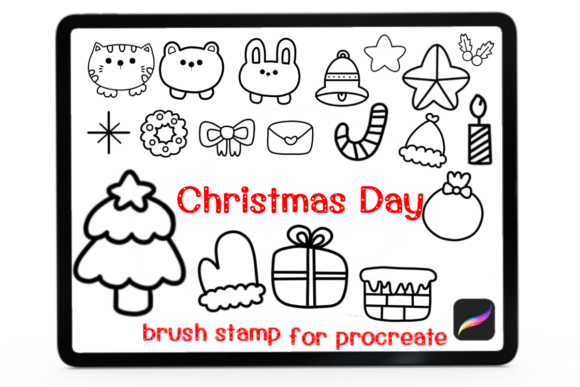
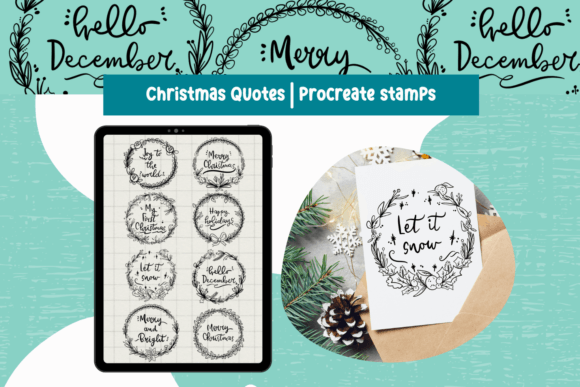
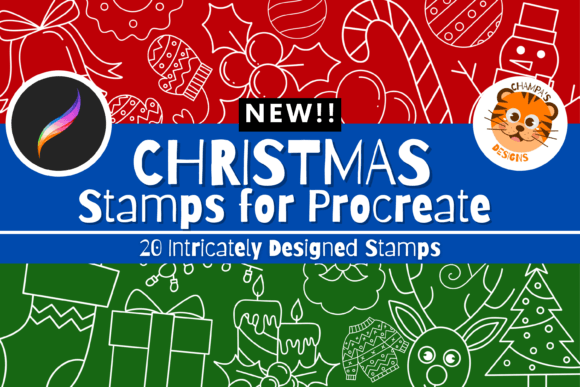
This specific product contains twenty distinct Christmas-themed stamp brushes designed exclusively for the Procreate application. These stamps are tailored for cartoons and illustrations, offering a quick way to add festive elements like trees, ornaments, snowflakes, and holiday motifs to your artwork. While the promise of speed and ease is appealing, success depends on proper setup, realistic expectations, and an understanding of the technical limitations inherent in digital brush files.
Understanding Compatibility and Platform Limitations
The most common and costly mistake users make involves software compatibility. It is crucial to understand that this set is strictly for Procreate. It will not work on Photoshop, Clip Studio Paint, Adobe Fresco, or any other drawing software. Many beginners assume that a ".brushset" file is a universal standard, but it is proprietary to Procreate’s ecosystem. Attempting to import these files into other applications will result in error messages or corrupted data, leading to unnecessary confusion.
Furthermore, hardware requirements are often overlooked. To use these brushes, you must have an iPad or iPhone with the Procreate app installed. While an Apple Pencil is recommended for precision and pressure sensitivity, it is not strictly required; you can still utilize stamp brushes with your finger. However, if you are planning to do detailed illustration work alongside these stamps, the lack of a stylus may hinder your overall workflow. Before purchasing, verify that your device supports the current version of Procreate. Older iPads that cannot update to the latest iOS may face compatibility issues with newer brush formats.
Clarifying the Nature of Digital Products
A significant source of customer dissatisfaction stems from misunderstanding the delivery method. This is a digital file. You will not receive a physical package, a printed book, or a tangible item in the mail. Upon purchase, you receive a download link or a file that you must save to your device. For users accustomed to physical art supplies, this shift can be disorienting.
To avoid post-purchase anxiety, ensure you know how to manage files on your iPad or iPhone. You need to save the downloaded file to a location accessible by the Procreate app, such as the "On My iPad" folder or iCloud Drive. If you are unfamiliar with importing files, take a moment to watch a tutorial on "how to import brushes into Procreate" before you even buy the set. This preparation ensures that once you have the file, you can start creating immediately without technical hurdles.
Optimizing Usage for Professional Results
Once imported, another frequent error is treating stamp brushes as standalone artwork. Some users place a stamp on the canvas and leave it flat, which can look disjointed and amateurish. Stamp brushes are tools, not finished pieces. To achieve high-quality results, you must integrate them into your composition. This means adjusting their color to match your palette, changing their opacity to create depth, and using layer modes like "Multiply" or "Overlay" to blend them naturally with backgrounds.
For example, if you are creating a holiday card, do not simply scatter twenty different stamps randomly across the page. Instead, choose three or four complementary elements—perhaps a wreath, a bell, and some holly—and arrange them thoughtfully. Use the transform tool to resize and rotate them, creating a balanced composition. This approach transforms a simple stamp into a cohesive design element. Remember, these brushes are perfect for cartoons and illustrations, so embrace a playful, stylized aesthetic rather than striving for hyper-realism, which may not be the strength of pre-made stamps.
Efficiency vs. Creativity: Finding the Balance
While these brushes are designed to save time, relying on them too heavily can stifle creativity. A common pitfall is using the same few stamps repeatedly across multiple projects, making your portfolio look repetitive. To avoid this, use the Christmas Stamps Procreate Brush Stamp set as a foundation, not the entire structure. Combine these digital stamps with hand-drawn elements. Sketch your own backgrounds, add custom typography, or draw unique characters that interact with the stamped objects. This hybrid approach maintains efficiency while ensuring your work remains original and engaging.
Additionally, consider the resolution and scale. Stamp brushes in Procreate are vector-based or high-resolution raster images, but they can lose quality if scaled up excessively beyond their intended size. Test each stamp at various sizes to determine its optimal use case. Some may work well as large focal points, while others are better suited as subtle background textures. Understanding these nuances allows you to use the tool more effectively, preventing pixelation or blurriness in your final exports.
Pre-Purchase Checklist for Smart Buyers
Before you commit to buying this or any similar digital asset, run through a quick mental checklist to ensure it aligns with your needs:
- Software Check: Do you actively use Procreate on an iPad or iPhone? If you primarily work on desktop software, this product is not for you.
- Style Match: Review the preview images carefully. Do the cartoon-style illustrations match your brand or artistic voice? If your style is minimalist or photorealistic, these whimsical stamps might clash.
- File Management: Are you comfortable downloading and importing files on your mobile device? If not, be prepared to spend a few minutes learning this process.
- Project Scope: Do you have upcoming holiday projects? Buying seasonal tools right before the season ensures you get immediate value. Purchasing them in July might mean you forget how to use them by December.
Final Thoughts on Digital Holiday Tools
The Christmas Stamps Procreate Brush Stamp set is a powerful resource for anyone looking to streamline their holiday creative workflow. By avoiding common mistakes related to compatibility, expectations, and usage, you can unlock the full potential of these twenty themed brushes. Remember that digital tools are only as good as the skill with which they are applied. Take the time to learn the import process, experiment with layer settings, and combine these stamps with your unique artistic touch. When used correctly, this set can significantly enhance your productivity and help you deliver charming, professional-quality holiday illustrations with confidence.