Simple Procreate Dot Brush for iPad Art: A Practical Review
Digital illustration on the iPad has evolved into a sophisticated medium, offering tools that rival traditional media in versatility and precision. For artists who value minimalism, stippling techniques, or clean graphic design elements, the choice of brush can significantly impact workflow efficiency and aesthetic outcome. The Simple Procreate Dot Brush for iPad Art represents a specialized toolset designed to address these specific needs. This article evaluates the utility, features, and practical applications of this mini brush set pack bundle, helping digital artists determine if it aligns with their creative objectives.
Understanding the Toolset
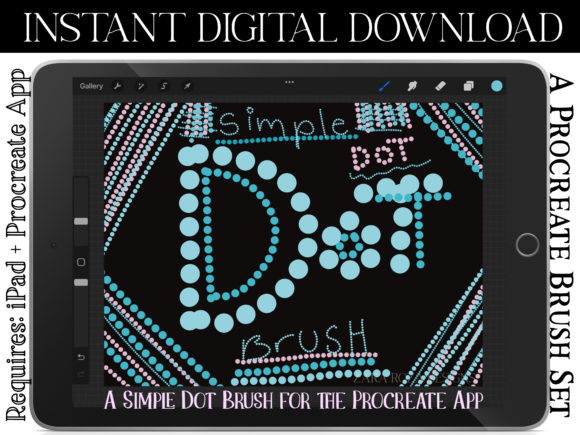
At its core, this product is a curated collection of digital brushes formatted specifically for the Procreate application on iPad and iPad Pro. Unlike comprehensive brush libraries that contain hundreds of varied textures, this set focuses exclusively on dot creation. The package includes a single .brushset file containing eight distinct brushes. These are not merely duplicates; they are engineered variations intended to provide control over line weight and opacity through Apple Pencil pressure sensitivity.
The set typically includes four primary functional types, often duplicated or varied slightly to reach the total count of eight brushes:
- Original Brush: A standard dot brush with fixed parameters, providing consistent output regardless of pressure.
- Pressure-Sensitive Opacity: Allows the artist to control the transparency of the dot by varying the pressure applied to the screen.
- Pressure-Sensitive Width: Adjusts the size of the dot based on pressure, enabling dynamic scaling without changing brush settings manually.
- Pressure-Sensitive Width and Opacity: Combines both variables, offering the highest degree of organic control for natural-looking stippling or fading effects.
It is important to note that this tool requires the Procreate app installed on an iPad or iPad Pro. It is not compatible with other digital art software such as Adobe Fresco, Clip Studio Paint, or desktop-based programs like Photoshop.
Why Artists Choose Specialized Dot Brushes
While Procreate comes with a robust default library, specialized brushes like the Simple Procreate Dot Circle Shape Brush for iPad Digital Art offer streamlined workflows for specific tasks. Creating perfect circles or consistent dots using a standard round brush can be time-consuming and often results in irregular shapes due to hand movement. This brush set automates the geometry, ensuring that every mark made is a precise circle.
Artists interested in stippling, a technique that uses small dots to create tone and texture, benefit significantly from pressure-sensitive variations. Traditional stippling with a pen requires immense patience and physical consistency. Digital stippling with these brushes allows for faster coverage and easier correction. Furthermore, graphic designers and hand letterers often require uniform dots for decorative elements, bullet points in digital planners, or accent marks in calligraphy. Having a dedicated tool for this reduces the need for constant zooming and manual adjustment.
Benefits and Practical Applications
The primary advantage of this mini brush set is its simplicity. For users overwhelmed by complex brush engines with dozens of adjustable sliders, this set offers a "plug-and-play" experience. The inclusion of pressure-sensitive options means that artists can achieve depth and dimension intuitively. For example, when creating a cartoon illustration, an artist might use the width-sensitive brush to create varying sizes of halftone patterns quickly. In hand lettering, the opacity-sensitive brush can be used to add subtle texture to thick strokes without obscuring the underlying letterform.
The set is particularly strong for:
- Digital Planning and Journaling: Users who create digital planners on their iPads often need clean, minimalist icons and dividers. Dot brushes are essential for creating dotted grids, checklists, and decorative borders.
- Minimalist Illustration: Artists focusing on cute, simple, or minimalist styles rely on clean lines and basic shapes. These brushes eliminate the jagged edges that can occur when drawing small circles freehand.
- Graphic Design Elements: For those using the iPad for preliminary design work, these brushes help in mocking up halftone effects or texture overlays rapidly.
Tradeoffs and Considerations
Despite its utility, the Simple Procreate Dot Brush for iPad Art has limitations that potential buyers should consider. First, the scope is narrow. If an artist is looking for a versatile all-in-one solution for painting, sketching, and texturing, this set will not suffice. It is a supplementary tool, not a foundational library. Users must already possess a basic understanding of Procreate’s interface to integrate these brushes effectively into their existing workflow.
Another consideration is the reliance on hardware performance. While dot brushes are generally lightweight, the responsiveness of pressure sensitivity depends on the iPad model and the condition of the Apple Pencil tip. Older iPad models may exhibit slight latency, which can affect the precision of rapid stippling. Additionally, because the brushes are designed for simplicity, they may lack advanced customization options found in more expensive, professional-grade brush packs. Users who prefer to tweak grain, scattering, or jitter properties extensively may find these brushes too rigid.
When to Choose This Set Over Alternatives
Deciding whether to purchase this bundle depends largely on your current toolkit and artistic style. If you frequently find yourself adjusting the size and opacity of a standard round brush to create dot patterns, this set will save you time. It is a strong fit for hobbyists, students, and professionals who specialize in line art, calligraphy, or vector-style digital art.
However, alternatives may be worth considering if your needs are more complex. For instance, if you require textured dots that mimic ink bleed or paper grain, a more advanced stippling brush set with customizable grain sources would be more appropriate. Similarly, if you work primarily in raster-based painting rather than line art or graphic design, investing in a comprehensive texture or watercolor brush library might offer better value. Free alternatives exist within Procreate’s default library, such as the standard "Round" brush with shape dynamics enabled, though these require manual setup and may not offer the same immediate consistency as a pre-configured dot brush.
Making the Decision
To determine if the Simple Procreate Dot Brush for iPad Art aligns with your goals, evaluate your recent projects. Have you spent significant time trying to draw perfect circles or consistent dot patterns? Do you use stippling for shading? If the answer is yes, this tool addresses a specific pain point efficiently. The inclusion of eight variations ensures that you have options for different stages of the artistic process, from rough sketching to final detailing.
Ultimately, this brush set is a practical, low-risk addition to a digital artist’s arsenal. It does not promise to transform amateur work into masterpieces, but it does remove technical friction for specific tasks. For iPad Pro users engaged in hand lettering, doodling, or minimalist illustration, the convenience of pressure-sensitive, perfectly shaped dots can streamline the creative process, allowing more focus on composition and design rather than tool manipulation.