Spooky Creativity: Procreate Halloween Stamps
Digital illustration has evolved from a niche hobby into a robust professional toolkit, yet the pressure to produce high-quality assets quickly remains a constant challenge for creators. Whether you are designing seasonal marketing materials, crafting personalized greeting cards, or developing unique sublimation patterns, time is often your most scarce resource. This is where specialized tools like the Procreate Brushset - Halloween Stamps become invaluable. It is not merely about shortcuts; it is about expanding your creative vocabulary with ready-made, high-quality elements that allow you to focus on composition and storytelling rather than drawing every individual leaf, cobweb, or pumpkin from scratch.
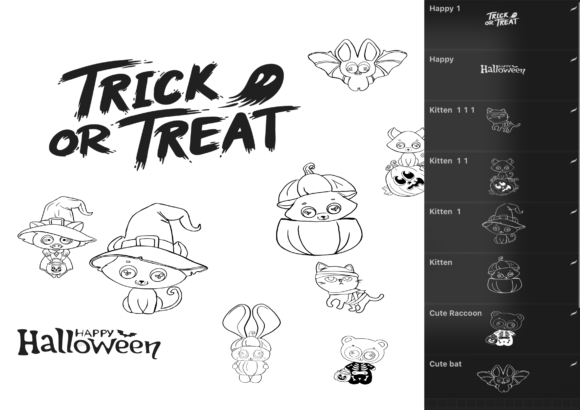
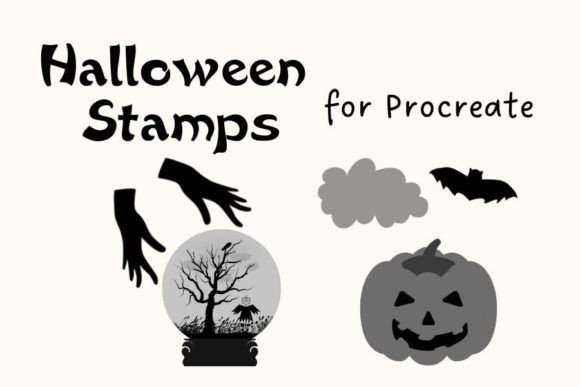
This digital stamp set offers a collection of 68 cool, haunt-themed stamps designed specifically for the Procreate ecosystem. These brushes are distinct because they balance funkiness with functionality. They are not just generic clipart; they are textured, stylized assets that integrate seamlessly into your existing workflow. For designers, marketers, and hobbyists alike, understanding how to leverage these stamps can transform a blank canvas into a festive masterpiece in minutes, providing a foundation upon which you can build complex, layered designs.
Expanding Your Creative Toolkit
The core value of the Procreate Brushset - Halloween Stamps lies in its versatility. With 68 unique stamps included in a single .brushset file, you have access to a wide array of motifs that capture the spirit of the season without falling into overly cliché or sterile categories. The term "funky" here is key. These stamps often feature hand-drawn imperfections, varied line weights, and organic shapes that mimic traditional ink or charcoal drawings. This aesthetic is crucial for modern design trends, which favor authenticity and warmth over rigid, vector-perfect precision.
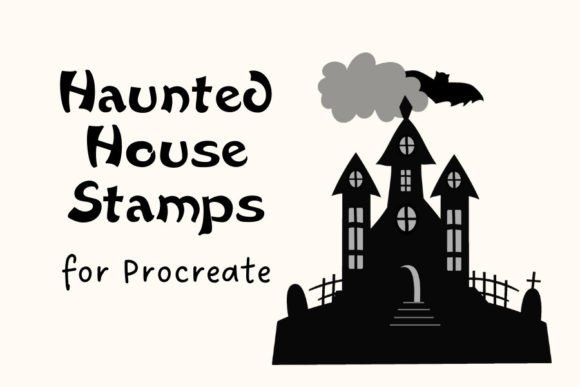
When you import this zip file into Procreate, you are not just adding images; you are adding building blocks. Consider the difference between drawing a complex haunted house facade versus placing a few well-chosen architectural stamps and blending them with background textures. The latter approach allows for rapid iteration. You can test different compositions, swap out elements, and adjust colors without the fatigue of repetitive drawing. This efficiency is particularly beneficial for freelancers and small business owners who need to produce multiple variations of a design for different clients or platforms.
Practical Applications for Designers and Marketers
For marketing professionals and entrepreneurs, the holiday season represents a peak period for consumer engagement. The Procreate Brushset - Halloween Stamps can be directly applied to create eye-catching social media graphics, email headers, and promotional banners. Because the stamps are designed to be flexible, they work well in both minimalistic and maximalist designs.
- Social Media Content: Use the smaller, simpler stamps to create borders or corner accents for Instagram stories. Layer them with bold typography to announce sales or events.
- Email Marketing: Create custom headers for Halloween-themed newsletters. A subtle pattern of bats or moons generated from the stamp set can add thematic consistency without overwhelming the text.
- Product Packaging: If you run an e-commerce store, use these stamps to design limited-edition labels or thank-you cards. The hand-drawn feel adds a personal touch that mass-produced graphics often lack.
The key to maintaining professionalism while using stamps is customization. Do not simply drop a stamp onto the canvas and leave it at default settings. Adjust the opacity, change the hue to match your brand palette, or use clipping masks to restrict the stamp’s texture to specific shapes. This ensures that the final output feels original and tailored to your specific audience, rather than looking like a generic template.
Crafting Personalized Projects and Gifts
Hobbyists and educators will find this brush set equally rewarding, particularly for projects involving print-on-demand services or handmade gifts. Sublimation design, for instance, requires high-resolution, transparent assets that can be tiled or arranged creatively. The stamps in this set are ideal for creating all-over prints for t-shirts, tote bags, or home decor items.
Imagine creating a repeating pattern for a Halloween tablecloth. By scattering various stamps from the set—mixing larger focal points like jack-o'-lanterns with smaller filler elements like stars or leaves—you can generate a seamless, dynamic pattern. Procreate’s symmetry tools can further assist in creating mandala-style designs or balanced compositions for coasters and pillows. For educators, these stamps can be used to create engaging classroom decorations, worksheet headers, or reward charts that resonate with students during the autumn months.
When working on sublimation or print projects, resolution and color mode are critical. Ensure your Procreate canvas is set to 300 DPI and the appropriate physical dimensions before stamping. This guarantees that the edges of your stamps remain crisp and clear when printed. Additionally, consider the background color of your final product. Since many of these stamps are likely black or dark-toned by default, you may need to invert colors or adjust blending modes to ensure visibility on dark fabrics or papers.
Installation and Workflow Integration
Integrating the Procreate Brushset - Halloween Stamps into your workflow is straightforward, designed to minimize technical friction. The file comes as a .brushset, which is the native format for Procreate brush libraries. To install, you simply download the zip file to your iPad. You can use AirDrop from a Mac or download it directly via Safari on your iPad. Once downloaded, tapping the file will automatically prompt Procreate to open and import the brushes.
Upon opening Procreate, you will find the new brush set appearing in your Brush Library. It is advisable to organize your workspace immediately. You might create a dedicated folder for seasonal assets or pin this brush set to your favorites for quick access during intense design sessions. The preview images included in the zip file serve as a visual catalog, allowing you to identify specific stamps without having to test each one individually on the canvas. This reference guide speeds up the selection process, enabling you to maintain creative flow.
Maintaining Originality and Consistency
A common concern when using pre-made assets is the risk of designs looking generic. To avoid this, treat the stamps as raw material rather than finished products. Combine multiple stamps to create new composite images. For example, layer a ghost stamp over a moon stamp, adjust the opacity of the ghost, and add a glow effect to create a unique spectral entity. Experiment with blending modes such as Multiply, Overlay, or Screen to integrate the stamps with background textures and colors.
Consistency in style is also achieved through uniform treatment. If you choose to add a distressed texture to one stamp, apply similar treatments to others in the same composition. Keep your color palette limited and intentional. By restricting yourself to three or four primary colors, you create a cohesive look that ties the disparate stamp elements together. This approach demonstrates a high level of design maturity, showing that you are using tools to enhance your vision, not replace it.
Ultimately, the Procreate Brushset - Halloween Stamps is more than a collection of images; it is a catalyst for creativity. It removes the barrier of entry for complex illustrations, allowing you to focus on the joy of creation. Whether you are a seasoned designer looking to streamline your workflow or a beginner eager to explore digital art, this tool provides the flexibility and fun needed to bring your Halloween visions to life. Embrace the quirky, funky nature of these stamps, and let them inspire you to push the boundaries of your digital canvases.