Evaluating the Mini Daisy Procreate Brush Stamp for Digital Design
Digital illustration and graphic design have evolved significantly with the advent of powerful tablet applications like Procreate. For artists, designers, and hobbyists, the efficiency of workflow is often just as important as the final aesthetic output. In this context, specialized tools such as the Mini Daisy Procreate Brush Stamp offer a streamlined approach to creating repetitive patterns, decorative elements, and greeting cards. This article evaluates the utility, compatibility, and practical application of this specific brush set to help you determine if it aligns with your creative needs.
Understanding the Tool: What Is the Mini Daisy Brush Set?
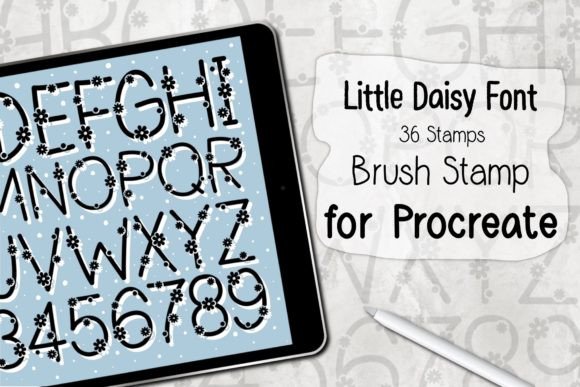
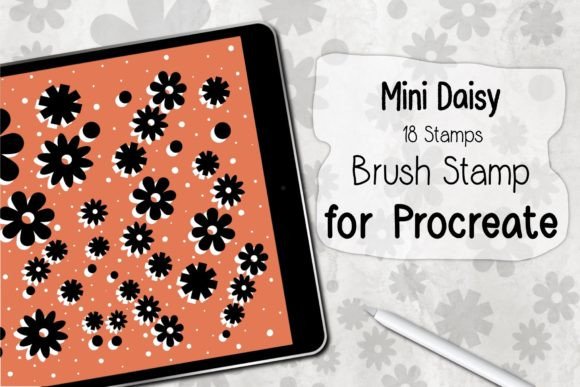
The Mini Daisy Procreate Brush Stamp is a digital asset designed specifically for the Procreate application on iPad. Unlike standard painting brushes that simulate traditional media like watercolor or charcoal, stamp brushes function more like digital stickers or stencils. When you tap or drag the Apple Pencil across the canvas, the brush deposits a pre-designed image—in this case, various iterations of mini daisy flowers.
This particular set includes 18 unique stamp variations contained within a single .brushset file. The primary value proposition here is immediacy. Rather than drawing each flower petal by petal, which requires significant time and steady hand-eye coordination, users can place complex floral elements instantly. This makes the tool particularly relevant for projects requiring consistency and speed, such as pattern design, scrapbooking, or surface pattern creation for textiles and stationery.
Key Benefits and Workflow Efficiency
The most compelling argument for adopting the Mini Daisy Procreate Brush Stamp is time conservation. In professional design environments, billable hours matter. Creating intricate floral patterns from scratch can be labor-intensive. By utilizing a stamp set, creators can lay down the foundational elements of a design in minutes rather than hours. This allows more time to be spent on composition, color grading, and adding unique artistic touches that stamps cannot provide.
Furthermore, the ease of use lowers the barrier to entry for beginners. Individuals who may feel intimidated by freehand drawing can still produce professional-looking results. The pressure sensitivity of the Apple Pencil interacts with these brushes to allow for variation in opacity or size, depending on how the brush is configured, adding a layer of organic feel to otherwise rigid stamps. This balance between automation and control is crucial for maintaining an artistic touch while leveraging digital shortcuts.
Ideal Use Cases
- Greeting Card Design: The delicate nature of mini daisies makes them ideal for birthday, thank-you, or seasonal cards where a soft, welcoming aesthetic is desired.
- Pattern Creation: Designers creating seamless patterns for fabric, wallpaper, or digital backgrounds can use these stamps to quickly establish motif repetition.
- Digital Planning and Journaling: Users of digital planners often look for decorative elements to highlight dates or events. Stamp brushes are perfect for this micro-decoration.
- Social Media Content: Quick embellishments for Instagram stories or Pinterest pins can be achieved rapidly, keeping content production schedules on track.
Technical Requirements and Compatibility
Before purchasing or downloading any digital brush set, it is critical to verify hardware and software compatibility. The Mini Daisy Procreate Brush Stamp is not a standalone application; it is an add-on that relies entirely on the Procreate ecosystem. Therefore, specific requirements must be met to ensure functionality.
First, the user must possess an iPad capable of running Procreate. While many older models support the app, performance may vary with complex canvases. Second, a stylus is required. Specifically, an Apple Pencil or a compatible, pressure-sensitive stylus is necessary to utilize the full range of the brush’s capabilities. Without pressure sensitivity, the ability to vary stroke weight or opacity may be lost, reducing the versatility of the stamps.
Software-wise, the device must be running Procreate Version 5.0 or higher. Older versions of the app may not support the newer .brushset file format, leading to installation errors or corrupted brushes. It is advisable to update the Procreate app via the App Store before attempting to install new assets.
Installation and Usability Considerations
The installation process for this brush set is designed to be straightforward, reflecting the user-friendly nature of the Procreate platform. The file is typically distributed as a ZIP archive. Users must download the file and unzip it using their iPad’s Files app or a third-party extraction tool. Once extracted, selecting the .brushset file and choosing "Open in Procreate" triggers an automatic installation. The brushes will then appear in the Brush Library, ready for immediate use.
However, users should be aware of a significant limitation: these brushes work ONLY in the Procreate application. They are not compatible with Adobe Fresco, Clip Studio Paint, Photoshop, or any other desktop or mobile illustration software. If your workflow involves switching between multiple applications, this exclusivity may be a tradeoff. You cannot export the brush itself for use elsewhere, although you can, of course, export the artwork created with it as standard image files like PNG or JPEG.
Evaluating Tradeoffs and Alternatives
While the convenience of stamp brushes is undeniable, there are tradeoffs to consider. The primary concern for serious artists is originality. Because these are pre-made assets, there is a risk that designs may look generic if used without modification. To mitigate this, it is recommended to use the stamps as a base layer and then customize them using Procreate’s transformation tools, color adjustments, and additional hand-drawn details.
Another consideration is the learning curve associated with digital asset management. Beginners may struggle with organizing large libraries of brushes. It is helpful to create dedicated brush sets within Procreate to keep frequently used stamps accessible and clutter-free.
For those who require vector-based scalability or cross-platform compatibility, alternatives such as Adobe Illustrator’s symbol libraries or Procreate’s vector layers (if available in future updates) might be worth considering. Additionally, artists who prioritize complete creative control may prefer creating their own custom brushes from scratch, though this requires a higher skill level and time investment.
Making the Decision: Is This Brush Set Right for You?
Deciding whether to integrate the Mini Daisy Procreate Brush Stamp into your toolkit depends on your specific goals. If you are a professional designer looking to speed up repetitive tasks, or a hobbyist wanting to create beautiful floral designs without extensive drawing practice, this tool offers high value. The low cost relative to the time saved makes it a practical investment.
Conversely, if you are strictly focused on hyper-realistic botanical illustration where every petal must be anatomically precise and unique, a stamp set may feel restrictive. In such cases, reference photos and custom painting techniques would yield superior results.
Ultimately, the Mini Daisy Procreate Brush Stamp serves as a functional bridge between idea and execution. It empowers creators to focus on composition and storytelling rather than getting bogged down in the minutiae of drawing individual flowers. By understanding its limitations and leveraging its strengths, you can enhance your digital workflow and enjoy the creative process with greater efficiency.