Streamlining Digital Greeting Design with the Gifts V5-7 Procreate Brush Stamp Set
In the evolving landscape of digital illustration, efficiency often dictates the viability of a creative workflow. For artists who frequently produce greeting cards, pattern designs, or social media graphics, the time spent drawing repetitive elements can quickly outweigh the joy of creation. This is where specialized tools like the Gifts V5-7 Procreate Brush Stamp set become essential resources rather than mere shortcuts. By integrating pre-designed stamps into the Procreate ecosystem, creators can shift their focus from technical execution to compositional storytelling.
This article explores the utility of the Gifts V5-7 brush set, examining how it compares to manual illustration methods and other digital assets. We will evaluate its specific features, installation requirements, and ideal use cases to help you determine if this tool aligns with your artistic goals.
Understanding the Value of Stamp Brushes in Digital Art
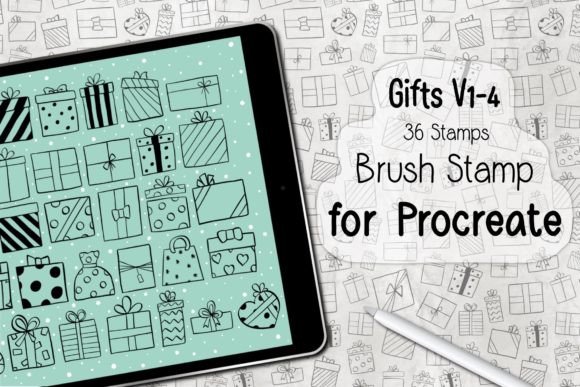
Before diving into the specifics of the Gifts V5-7 set, it is important to understand the role of stamp brushes in modern digital art. Unlike standard painting brushes that simulate media like watercolor, oil, or pencil, stamp brushes function as dynamic placeholders for complex shapes. Each tap of the stylus places a fully rendered image—such as a gift box, ribbon, or decorative element—onto the canvas.
The primary advantage of this approach is consistency. When creating a pattern or a series of cards, maintaining uniform style and proportion manually is challenging. The Gifts V5-7 Procreate Brush Stamp ensures that every gift icon shares the same aesthetic lineage, providing a cohesive look across multiple projects. For professionals managing tight deadlines, this consistency reduces the need for extensive post-production editing.
Features and Composition of the Gifts V5-7 Set
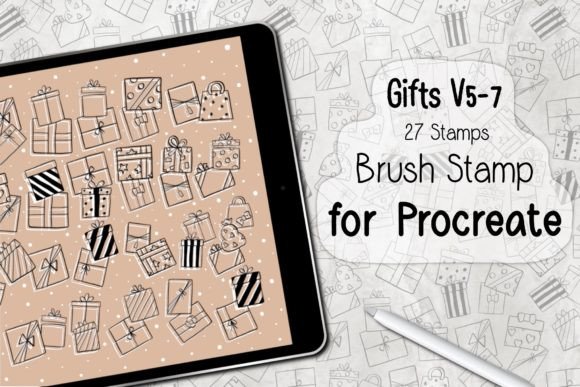
The core of this product is a curated collection of twenty-seven distinct stamps, packaged within a single .brushset file. This format is native to Procreate, ensuring seamless integration without the need for third-party converters or complex setup procedures. The variety within the set allows for diverse compositions, enabling users to mix and match elements to create unique arrangements.
Key Technical Specifications
- Content: 27 individual gift-themed stamps.
- Format: .brushset file (Procreate native).
- Compatibility: Requires Procreate Version 5.0 or higher.
- Hardware: Optimized for iPad Pro or standard iPad models paired with an Apple Pencil or compatible pressure-sensitive stylus.
The inclusion of pressure sensitivity support is a notable feature. While stamps are generally static images, the ability to adjust opacity or size based on stylus pressure adds a layer of organic variation. This prevents the "copy-paste" look that often plagues low-quality stamp sets, allowing for more natural-looking distributions in patterns.
Comparing Stamp Brushes to Manual Illustration
When evaluating whether to adopt the Gifts V5-7 Procreate Brush Stamp, it is helpful to compare it against the traditional method of hand-drawing each element. Both approaches have distinct merits depending on the project scope.
Time Efficiency vs. Creative Control
Manual illustration offers unlimited creative control. If you need a gift box with a very specific angle, lighting condition, or ribbon style that does not exist in any library, drawing it from scratch is the only option. However, this comes at a significant time cost. Creating twenty-seven unique, high-quality gift illustrations could take hours or even days.
In contrast, the Gifts V5-7 set allows you to populate a scene in minutes. For projects where the subject matter is secondary to the overall composition—such as background patterns for wrapping paper or filler elements in a busy greeting card—the trade-off favors speed. The set acts as a foundational layer, which you can then customize with color adjustments, overlays, or additional hand-drawn details.
Consistency in Pattern Design
Pattern design requires rigorous repetition and alignment. Achieving this manually demands advanced skills in vector tools or meticulous grid work in raster programs. Stamp brushes simplify this process by providing ready-made tiles. While dedicated pattern-making software exists, using a brush set within Procreate keeps the entire workflow in one application, reducing context switching and file management overhead.
Installation and Workflow Integration
One of the most frequent barriers to adopting new digital assets is the complexity of installation. The Gifts V5-7 set is designed to minimize this friction. The process is straightforward and typically takes less than two minutes.
- Download and Unzip: After purchasing, download the ZIP file to your iPad or cloud storage service accessible from your iPad. Extract the contents to reveal the .brushset file.
- Open in Procreate: Tap the file and select "Open in Procreate." The application will automatically recognize the format and import the brushes.
- Access the Library: Open the Brush Library in Procreate. The new set will appear at the top of your brush list, ready for immediate use.
This ease of installation is a significant advantage over custom brush packs that require manual configuration of settings or texture imports. For users who are not technically inclined, this plug-and-play functionality lowers the barrier to entry.
Ideal Use Cases for the Gifts V5-7 Brush Set
While versatile, this tool is not a universal solution for all illustration needs. Understanding its best-fit scenarios helps maximize its value.
Greeting Card Creation
The most obvious application is in the design of holiday and birthday cards. The thematic nature of "gifts" aligns perfectly with celebrations. Users can quickly assemble a focal point by layering different stamps, adding text, and applying filters. The ability to experiment with layouts rapidly allows for greater creative exploration during the drafting phase.
Surface Pattern Design
For designers creating wrapping paper, fabric prints, or digital backgrounds, the Gifts V5-7 set provides a quick way to generate repeating motifs. By scattering the stamps across a canvas and using Procreate’s symmetry tools, you can create intricate, seamless patterns with minimal effort. This is particularly useful for print-on-demand services where volume and variety are key to success.
Social Media Graphics
Content creators often need to produce visually appealing graphics on tight schedules. Using pre-made stamps allows for the rapid creation of festive posts, stories, or promotional banners. The consistent style helps maintain brand identity across multiple posts without requiring daily illustration work.
Limitations and Considerations
Despite its benefits, the Gifts V5-7 Procreate Brush Stamp has limitations that potential users should consider.
- Platform Restriction: These brushes work exclusively in Procreate. If you primarily use Adobe Fresco, Photoshop, or Clip Studio Paint, this asset will not be usable without conversion, which may degrade quality.
- Customization Limits: While you can change colors and sizes, the underlying shape of each stamp is fixed. If you require highly specific structural changes to the gift boxes, you may still need to draw over them or use a vector tool.
- Overuse Risk: Relying too heavily on stamps can lead to generic-looking artwork. To maintain a unique voice, it is advisable to combine stamps with hand-drawn elements, textures, and custom color palettes.
Making the Decision: Is This Set Right for You?
Choosing the right digital tools depends on your workflow, skill level, and project types. The Gifts V5-7 set is an excellent choice if you:
- Work primarily within the Procreate ecosystem on an iPad.
- Produce high volumes of greeting cards or pattern-based designs.
- Value time efficiency and want to reduce repetitive drawing tasks.
- Are looking for a consistent, professional aesthetic for gift-themed projects.
However, if you are a purist who prefers hand-drawing every element, or if you work across multiple software platforms, you may find the utility limited. In such cases, investing time in building your own custom brush library or using vector-based tools might offer more long-term flexibility.
Ultimately, the Gifts V5-7 Procreate Brush Stamp serves as a powerful accelerator for specific creative tasks. It bridges the gap between conceptualization and completion, allowing artists to enjoy the creative process without getting bogged down in mechanical repetition. By understanding its strengths and limitations, you can integrate it effectively into your toolkit, enhancing both productivity and artistic output.