Streamline Your Digital Design Workflow with the Little Cupcake Font Procreate Stamp
In the fast-paced world of digital illustration and graphic design, efficiency is not just a luxury; it is a necessity. Whether you are a freelance illustrator meeting tight deadlines, a small business owner creating social media assets, or an educator designing engaging visual materials, the time spent on repetitive tasks can significantly impact your overall productivity. This is where specialized tools like the Little Cupcake Font Procreate Stamp become invaluable. By integrating pre-made typographic elements into your creative process, you shift your focus from manual construction to strategic composition, allowing for a smoother, more professional workflow.
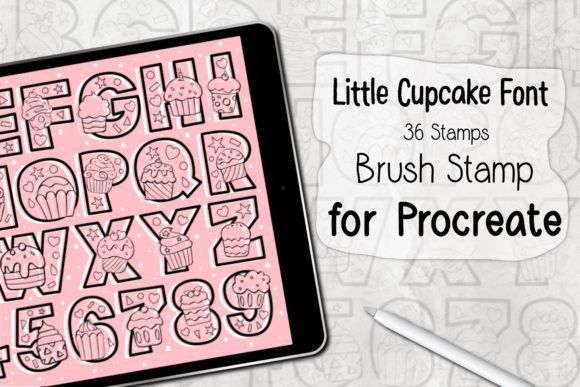
The Little Cupcake Font Procreate Brush Stamp set is designed to bridge the gap between custom lettering and rapid content creation. It offers a collection of 36 distinct stamp brushes that replicate the charm of hand-lettered typography without the hours of practice and execution required to draw each character manually. For professionals and hobbyists alike, understanding how to effectively incorporate this tool into your existing pipeline can transform how you approach card design, pattern making, and digital branding.
Integrating Typography Stamps into Your Creative Process
Before diving into the technical installation, it is crucial to understand where the Little Cupcake Font Procreate Stamp fits within a broader project lifecycle. In traditional design workflows, typography is often one of the most time-consuming phases. Designers must select fonts, adjust kerning, manage line breaks, and ensure visual harmony. While standard text boxes in Procreate offer functionality, they lack the organic, hand-crafted feel that many modern audiences crave. Conversely, drawing every letter by hand ensures uniqueness but sacrifices speed.
This brush set serves as a hybrid solution. It allows you to maintain the aesthetic appeal of hand-lettering while leveraging the speed of digital stamps. You can utilize these stamps at various stages of your project:
- Pre-production Planning: Use the stamps to quickly mock up layout ideas. Because the brushes are instant, you can test different phrases and placements without committing to final artwork.
- Active Creation: During the main design phase, layer the stamps over your illustrations to create cohesive greeting cards, invitations, or promotional graphics.
- Pattern Development: The set is particularly effective for creating seamless patterns. By repeating specific characters or words, you can generate textured backgrounds that add depth to your designs.
By viewing the Little Cupcake Font Procreate Brush Stamp as a modular asset rather than just a font, you open up new possibilities for iterative design. You can experiment with opacity, blending modes, and color overlays to ensure the text integrates seamlessly with your underlying artwork, maintaining a high standard of quality control throughout the process.
Technical Requirements and Compatibility
To ensure a smooth implementation of this tool, it is essential to verify that your hardware and software environment meets the necessary specifications. The Little Cupcake Font Procreate Stamp is optimized specifically for the Procreate ecosystem, leveraging its unique brush engine capabilities. Attempting to use these assets in other applications will not yield the intended results, as the file format is proprietary to Procreate.
Here are the specific requirements for optimal performance:
- Hardware: You will need an iPad Pro or a standard iPad model that supports Procreate. Additionally, an Apple Pencil or a compatible, pressure-sensitive stylus is required to fully utilize the responsiveness of the brush engine.
- Software: The brush set requires Procreate Version 5.0 or higher. Ensuring your app is updated guarantees that you have access to the latest brush features and stability improvements.
Verifying these prerequisites before purchase or download prevents workflow interruptions. For professionals managing multiple devices, it is advisable to standardize your Procreate version across all units to ensure consistency when syncing projects via iCloud or other cloud services.
Installation and Setup for Immediate Use
One of the standout features of the Little Cupcake Font Procreate Brush Stamp is its ease of installation. The developers have streamlined the process to save you time, allowing you to move from download to creation in minutes. The package comes as a ZIP file containing a single .brushset file, which includes all 36 stamps organized for immediate access.
Follow this practical guide to install the brush set efficiently:
- Download and Extract: After purchasing, download the ZIP file to your iPad. Use the Files app to unzip the archive. This step is critical; Procreate cannot read compressed files directly.
- Open in Procreate: Locate the extracted .brushset file. Tap on it and select "Open in Procreate" from the share sheet. Alternatively, you can import it directly through the Brush Library by tapping the "+" icon and selecting "Import."
- Automatic Installation: Procreate will automatically install the brush set. You will see a new brush group appear in your Brush Library, typically named after the set.
- Verification: Open a new canvas and navigate to the Brush Library. Locate the new group and test a few stamps to ensure they are rendering correctly.
This straightforward installation process minimizes technical friction, allowing you to focus on creativity rather than troubleshooting. For teams or educators distributing this tool to students or colleagues, providing a simple screenshot guide of these steps can further reduce support queries and enhance adoption rates.
Practical Applications and Workflow Tips
Once installed, the real value of the Little Cupcake Font Procreate Stamp lies in its application. Here are several ways to integrate these stamps into your daily workflow to maximize efficiency and creative output.
Greeting Card and Invitation Design
For entrepreneurs selling digital or physical greeting cards, consistency and speed are key. Use the stamps to create standardized headers such as "Happy Birthday," "Thank You," or "Congratulations." By saving these compositions as templates, you can rapidly customize cards for different clients by simply changing the background illustration or color palette. This approach ensures brand consistency while reducing production time per unit.
Pattern and Texture Creation
The 36 stamps offer a variety of characters and symbols that can be used to create intricate patterns. Rotate, scale, and duplicate the stamps to build complex backgrounds. Use the "Alpha Lock" feature in Procreate to clip these patterns to specific shapes, adding texture to your illustrations without overwhelming the main subject. This technique is particularly useful for packaging design and textile patterns.
Social Media Content
Marketers and bloggers can use the Little Cupcake Font Procreate Brush Stamp to create eye-catching quotes and headlines for Instagram posts or Pinterest pins. The hand-lettered aesthetic adds a personal touch that resonates well with audiences seeking authenticity. Combine the stamps with simple geometric shapes or photos to create professional-looking graphics in minutes.
Maintaining Quality and Consistency
While stamps offer speed, maintaining artistic integrity requires attention to detail. To ensure your final output looks professional, consider the following best practices:
- Color Harmony: Avoid using pure black for your stamps unless necessary. Sample colors from your illustration to create a cohesive look. Adjust the hue and saturation to match the mood of your piece.
- Layer Management: Keep your stamp layers separate from your background and illustration layers. This non-destructive workflow allows you to adjust opacity, blending modes, or position without affecting the rest of your artwork.
- Scaling Appropriately: Since these are raster-based stamps, avoid scaling them up excessively, which can lead to pixelation. If you need larger text, consider creating your composition at a higher resolution from the start.
By treating the Little Cupcake Font Procreate Stamp as a flexible component of your design toolkit, you can enhance both the quality and efficiency of your work. It empowers you to produce polished, professional-grade visuals while respecting the constraints of time and resources. Whether you are streamlining a business workflow or exploring new creative hobbies, this tool offers a practical pathway to achieving your design goals with confidence and ease.
♥♥ Thanks you ♥♥