Mastering the Paw Print Stamp Brush
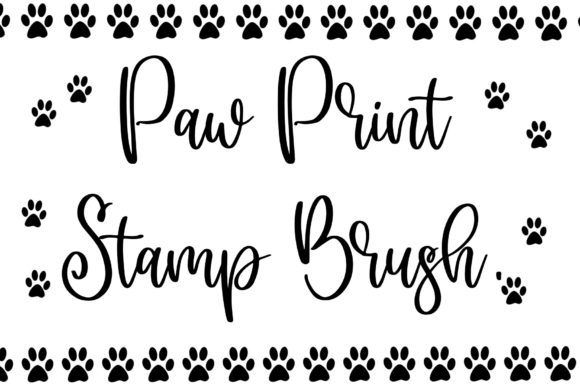
Digital illustration has evolved from a niche hobby into a robust professional industry, yet the tools we use often retain a playful spirit. For artists, designers, and content creators working within the Procreate ecosystem, the Paw Print Stamp Brush offers a delightful blend of whimsy and utility. Whether you are designing branding materials for a pet care startup, creating educational materials for children, or simply adding a personal touch to digital planners, this specialized tool streamlines the creative process. It eliminates the tedious task of drawing repetitive organic shapes by hand, allowing you to focus on composition and storytelling.
Why Choose a Dedicated Stamp Brush?
In the world of digital art, efficiency is just as valuable as aesthetic skill. Drawing a single paw print might take seconds, but illustrating a trail of them across a landscape or filling a background pattern can become monotonous and time-consuming. This is where the Paw Print Procreate Stamp Brush shines. Unlike standard brushes that rely on pressure sensitivity to vary line weight, stamp brushes are designed to place pre-defined shapes with consistency and speed.
The primary strength of this tool lies in its uniformity. Each stamp maintains the same structural integrity, ensuring that your design elements look cohesive. However, modern stamp brushes are rarely static. They often include subtle variations in rotation, size, or opacity to mimic natural randomness. This prevents the "copy-paste" look that plagues amateur designs, giving your artwork an organic feel despite using a digital shortcut. For professionals, this means faster turnaround times on client projects without sacrificing quality.
Practical Applications Across Industries
The versatility of the Paw Print Stamp Brush extends far beyond simple doodles. Its application spans various sectors, proving that niche tools can have broad impacts.
Branding and Marketing
Pet-related businesses are booming, from groomers and veterinarians to boutique pet food brands. A consistent visual identity is crucial for these companies. Using a custom paw print stamp allows marketers to create branded patterns for social media backgrounds, packaging designs, and merchandise. Instead of hiring an illustrator to draw hundreds of prints, a designer can generate complex textures in minutes, maintaining brand consistency across all platforms.
Educational Content Creation
Educators and publishers creating materials for early childhood development often need engaging, recognizable icons. Paw prints are universally understood and appealing to children. Teachers can use these stamps to create reward charts, decorate worksheets, or illustrate stories about animals. The ease of use means that educators without advanced artistic training can still produce high-quality, visually appealing learning aids.
Digital Planning and Journaling
The digital planning community relies heavily on stickers and decorative elements. Users of apps like GoodNotes or Notability often import Procreate creations to enhance their daily logs. A paw print stamp brush allows hobbyists to quickly mark pet-related events, such as vet appointments or grooming days, within their digital calendars. It adds a layer of personalization that transforms a generic template into a unique, user-specific interface.
Getting Started: Installation and Setup
One of the most common hurdles for new iPad users is managing file formats, particularly ZIP archives. Most professional brush sets, including the Paw Print Procreate Stamp Brush, are distributed as ZIP files to keep the package compact and organized. Understanding how to handle these files on iOS is essential for a smooth workflow.
Here is a straightforward guide to preparing your brush for use:
- Locate the File: Open the Files app on your iPhone, iPod touch, or iPad. Navigate to the location where you downloaded the brush set, typically the "Downloads" folder.
- Uncompress the Archive: Tap the ZIP file. iOS will automatically uncompress it, creating a new folder containing the individual brush files. This step is crucial; Procreate cannot import brushes directly from a zipped archive.
- Organize Your Files: To keep your library tidy, you may want to rename the newly created folder. Touch and hold the folder, then select Rename. Give it a descriptive name like "Paw Prints" for easy retrieval later.
- Import to Procreate: Open the folder and tap on the specific brush file (usually ending in .brush or .brushset). This action will automatically launch Procreate and import the tool into your library.
- Access Your New Tool: Inside Procreate, open the brush selection panel. Scroll down to the Imported section. Your new paw print stamps will be ready for immediate use.
Maximizing Efficiency with Smart Settings
Once installed, the real power of the Paw Print Stamp Brush emerges through customization. While the default settings are optimized for general use, tweaking them can adapt the brush to specific project needs. For instance, adjusting the spacing parameter allows you to create continuous trails or scattered clusters. If you are designing a border, tighter spacing creates a seamless line. For a background texture, increasing the spacing adds breathing room and visual lightness.
Another critical setting is size jitter. Enabling this feature introduces random variations in the size of each stamp. This is particularly effective for simulating natural footprints, where an animal’s stride and pressure would naturally vary. Similarly, adjusting the rotation jitter ensures that no two prints look identical, breaking up the digital rigidity and enhancing the organic aesthetic.
Color and Layer Management
When using stamp brushes, color choice plays a pivotal role in the final output. For subtle textures, consider using a low-opacity brush on a separate layer. This allows you to blend the paw prints into the background using blending modes like Multiply or Overlay. For bold, graphic statements, solid colors on the top layer provide maximum contrast. Remember that because these are vector-based or high-resolution raster stamps, they scale well without losing clarity, making them suitable for both web graphics and print-ready designs.
Final Thoughts on Digital Workflow
Integrating specialized tools like the Paw Print Stamp Brush into your digital arsenal is not about cutting corners; it is about working smarter. By automating repetitive tasks, you free up mental energy for higher-level creative decisions. Whether you are a freelancer looking to deliver projects faster or a hobbyist seeking to enhance your digital journaling, understanding how to install and utilize these assets effectively can significantly elevate your output. Embrace the technology, customize it to your style, and let your creativity run wild.