Procreate Christmas Brush Stamps Guide
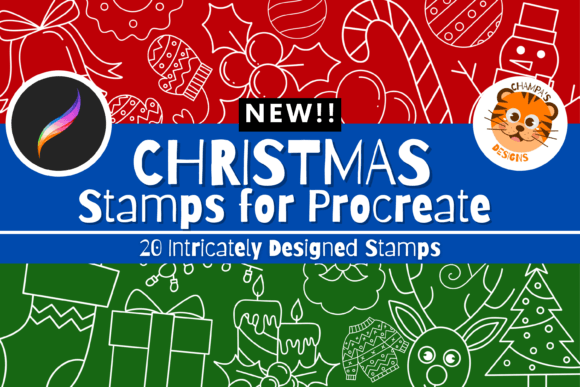
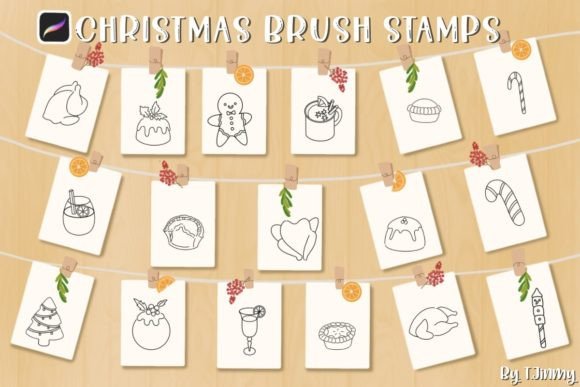
Holiday design deadlines are notoriously tight. Whether you are crafting social media graphics for a client, designing custom greeting cards for your small business, or simply adding festive flair to your personal digital journal, time is the one resource you cannot buy. This is where specialized tools like Procreate Christmas Brush Stamps become indispensable. Rather than drawing every holly leaf, candy cane, or steaming mug from scratch, these pre-made assets allow you to compose complex, professional-looking scenes in minutes. The specific collection featuring 17 individual food and drink stamps offers a curated blend of whimsy and warmth, perfectly suited for the modern digital creator.
The Power of Hand-Drawn Digital Assets
There is a distinct difference between generic clipart and hand-drawn brush stamps. The latter retains the organic imperfections and texture that make digital art feel human and inviting. These Procreate Christmas Foods and Drinks Brush Stamps were created directly within the Procreate ecosystem, ensuring that the line weight, texture, and style are optimized for the iPad’s pressure-sensitive capabilities. Because they are native brushes rather than static image overlays, they interact with your canvas in a dynamic way. You are not just pasting an image; you are stamping a tool that respects your chosen opacity, flow, and color settings.
The collection includes 17 unique designs, covering a delightful range of holiday edibles. Think gingerbread men with expressive faces, mugs of hot cocoa with marshmallows, festive cookies, and seasonal fruits. The variety allows for significant creative freedom. You are not locked into a single composition. Instead, you can mix and match elements to tell a visual story. Perhaps you need a cozy corner scene for a blog header, or maybe you are designing a pattern for wrapping paper. The ability to scale, resize, and recolor each stamp means that no two projects need look the same.
Technical Requirements and Compatibility
Before diving into the creative possibilities, it is crucial to understand the technical landscape. These brushes are engineered specifically for the Apple iPad environment. To use them effectively, you need an iPad, an Apple Pencil, or a compatible pressure-sensitive stylus, along with the Procreate app. It is important to note that these brushes do not work in Photoshop, Illustrator, or any other desktop-based graphic design software. They are .brushset files, a format exclusive to Procreate.
This specificity is actually a strength. By focusing solely on Procreate, the brushes leverage the app’s unique rendering engine, providing a smoother, more responsive experience than cross-platform alternatives often deliver. However, it does mean you must be working within the Apple ecosystem. If your workflow relies heavily on desktop applications, you would need to create your designs on the iPad and then export them for further editing elsewhere. For most mobile-first creators, bloggers, and social media managers, this is rarely an issue, as the iPad has become a powerhouse for professional-grade design.
Practical Applications for Creators and Businesses
The versatility of these Procreate Christmas Brush Stamps extends far beyond simple hobbyist doodling. For entrepreneurs and marketers, speed and consistency are key. Imagine you are running a December campaign for a bakery or a coffee shop. You can use these food and drink stamps to create daily Instagram stories that highlight seasonal specials. Because you can change the colors, you can match the stamps to your brand’s palette instantly, maintaining visual coherence while keeping content fresh.
Educators and bloggers also find immense value in these tools. Creating engaging headers for holiday-themed articles or worksheets becomes significantly faster. Instead of searching for stock photos that may carry licensing restrictions or lack the desired aesthetic, you can generate custom illustrations that are unique to your platform. This enhances user engagement and adds a layer of personal branding that generic images cannot achieve. For freelancers, offering quick-turnaround holiday graphics to clients becomes a viable service add-on, increasing revenue during the peak season.
Enhancing Workflow Efficiency
The primary benefit of using stamp brushes is efficiency. Drawing intricate details like the swirl of whipped cream or the icing on a cookie takes time. With these stamps, that detail is instant. You place the stamp, adjust its size, and move on. This reduction in manual labor allows you to focus on composition, layout, and typography—the elements that truly elevate a design. Furthermore, because the brushes are scalable without loss of quality (within the resolution limits of your canvas), you can use the same stamp for a tiny icon or a large background element.
Opacity and color adjustments further expand the utility. By lowering the opacity, you can create subtle watermarks or background textures. By changing the hue, you can transform a standard gingerbread man into a chocolate-covered treat or a sugar cookie. This flexibility ensures that the 17 stamps feel like hundreds of potential variations, maximizing the return on your investment.
How to Install and Use Your Brushes
Getting started with your new tools is straightforward, but following the correct steps ensures a smooth integration into your library. You will receive a single ZIP file containing the 17 Procreate Christmas Foods and Drinks Brush Stamps. Here is how to get them up and running:
- Unzip the File: Before attempting to import, ensure you have unzipped the downloaded file on your iPad. Procreate cannot read compressed ZIP files directly.
- Automatic Import: In many cases, downloading the file via Safari will automatically prompt an import into Procreate. If this happens, accept the prompt, and the brushes will appear in your library.
- Manual Import: If automatic import does not occur, locate the downloaded file in your Files app. Tap and hold the file with your finger or Apple Pencil.
- Select Share: Choose “Share” from the contextual menu that appears.
- Open in Procreate: Look for the “Open in Procreate” option. If it is not immediately visible, click on “More” and scroll to find it.
- Access Your Library: Open your project in Procreate. Click on the brush icon at the top right corner. You should see a new brush set containing your Christmas stamps. Similarly, check your palettes icon for any included color swatches.
Once installed, experiment with the settings. Try varying the pressure sensitivity to see how the stamps respond. Test different blending modes to see how they interact with underlying layers. The more you explore the settings, the more natural and integrated your designs will become.
Final Thoughts on Holiday Design
Incorporating Procreate Christmas Brush Stamps into your workflow is not just about saving time; it is about enhancing the quality and consistency of your holiday output. Whether you are a seasoned illustrator looking to speed up your process or a beginner eager to create beautiful seasonal art, these tools provide a solid foundation. They bridge the gap between technical skill and creative vision, allowing you to produce polished, professional results with ease. As the holiday season approaches, having reliable, high-quality assets at your fingertips can make the difference between stressed scrambling and joyful creating.