Watercolor Stamps for Procreate: Streamlining Your Digital Art Workflow
Digital illustration often faces a paradox: while technology offers infinite flexibility, it can sometimes strip away the organic unpredictability that makes traditional media so compelling. Artists and designers frequently spend hours trying to replicate the bleed of pigment on cold-press paper or the granulation of watercolor paints using standard digital brushes. This is where specialized assets like Watercolor Stamps for Procreate become essential tools in a modern creative workflow. By integrating pre-made, high-quality watercolor elements into your process, you bridge the gap between efficiency and artistic authenticity.
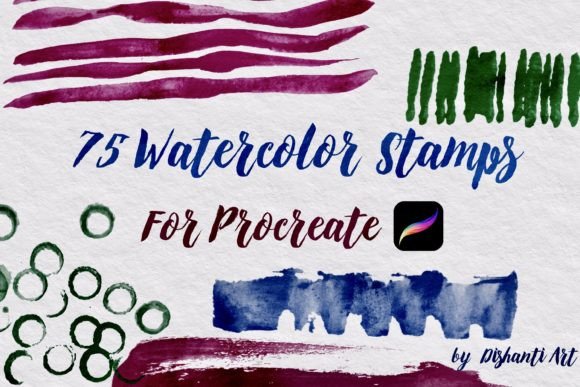
This set, comprising 75 distinct Watercolor Stamp Brushes and one Watercolor Texture Paper, is designed specifically for the Procreate app on iPad and Procreate Pocket on iPhone. It is not merely a collection of clipart; it is a functional resource intended to accelerate production without sacrificing the hand-painted aesthetic. For professionals, entrepreneurs, and hobbyists alike, understanding how to embed these stamps into your existing pipeline can significantly reduce turnaround time while enhancing visual consistency.
Integrating Stamps into the Creative Process
The value of Watercolor Stamps for Procreate lies in their versatility across different stages of a project. Rather than viewing them as a shortcut, consider them as foundational building blocks that allow you to focus on composition and narrative rather than repetitive rendering. Whether you are designing social media graphics, creating editorial illustrations, or developing brand assets, these stamps interact seamlessly with other digital tools and methods.
Pre-Production and Conceptualization
In the early phases of a project, speed is critical. When brainstorming concepts for clients or personal projects, you need to visualize ideas quickly. Using watercolor stamps during the sketching or mood-boarding stage allows you to establish color palettes and textural directions without committing to detailed painting. You can drag and drop various floral elements, abstract splashes, or organic shapes from the 75-brush library to test compositions. This rapid prototyping helps in making informed decisions about layout and balance before investing time in final rendering.
Furthermore, the included Watercolor Texture Paper serves as an immediate backdrop for these tests. By placing your sketches over this texture, you gain a realistic preview of how the final piece might look when printed or displayed. This early integration of texture ensures that the digital work maintains a tactile quality, preventing the "flat" appearance that often plagues purely vector-based or clean digital designs.
Execution and Layer Management
During the main execution phase, the stamps function as efficient layer components. Because these are brushes optimized for Procreate, they respond to pressure and tilt, allowing for nuanced application. However, their primary strength is consistency. If you are creating a series of illustrations for a blog or a product line, using the same set of stamps ensures a cohesive visual language. You do not need to repaint a leaf or a water splash identically ten times; instead, you stamp, adjust, and move on.
Effective workflow implementation here relies on organization. Create separate folders for background elements, foreground accents, and textural overlays. Use the clipping mask feature in Procreate to constrain your stamps within specific shapes. For instance, if you are designing a label for a small business product, you can place a watercolor wash stamp, clip it to the label shape, and then add typography on top. This method maintains clean edges while preserving the organic feel of the watercolor medium.
Compatibility and Technical Considerations
One of the most practical aspects of this asset pack is its targeted compatibility. It is engineered exclusively for the Procreate ecosystem, meaning it works natively on both iPad and iPhone via Procreate Pocket. This cross-device functionality is crucial for creators who switch between devices depending on their location or task complexity. You might begin a rough layout on your iPhone during a commute and refine the details on your iPad later in the day. The stamps retain their quality and behavior across both platforms, ensuring a seamless transition.
However, users must understand the technical nature of these files. These are .brushset and .jpg or .png files, not standalone applications. They require the Procreate app to function. Before purchasing or downloading, ensure your device meets the system requirements for the latest version of Procreate. Additionally, because these are raster-based stamps, resolution matters. While they are high-quality, scaling them up excessively beyond their intended size may result in pixelation. Best practice involves using them at or near their original size, or scaling down, to maintain crisp edges and natural texture.
Enhancing Efficiency for Business and Marketing
For marketers, bloggers, and small business owners, time is a finite resource. Creating unique visual content for daily social media posts or weekly newsletters can be exhausting. Watercolor Stamps for Procreate offer a solution by providing a library of reusable assets that can be remixed endlessly. You can create templates in Procreate that incorporate these stamps, allowing you to swap out text and minor elements while keeping the artistic backbone intact.
Consider a wedding invitation designer. Instead of painting new floral arrangements for every client, they can use the 75 stamps to build custom bouquets quickly. By rotating, recoloring, and overlapping the stamps, each design feels unique yet remains grounded in a consistent style. This approach increases throughput, allowing freelancers to take on more clients without burning out. It also simplifies the revision process; if a client wants "more greenery," you can simply add another leaf stamp rather than repainting an entire section.
Quality Control and Artistic Integrity
A common concern when using stamps or presets is the loss of artistic integrity. Critics might argue that using pre-made elements is "cheating." However, in professional workflows, tools are meant to serve the vision. The key to maintaining quality is customization. Do not simply drop a stamp onto the canvas and leave it. Use Procreate’s adjustment tools to modify hue, saturation, and brightness to match your specific color scheme. Apply blending modes such as Multiply or Overlay to integrate the stamp with underlying layers.
The included Watercolor Texture Paper is vital for this integration. By placing your stamped elements over this texture, or using the texture as a mask, you unify the disparate elements. The grain of the paper helps to blend the digital stamps into a cohesive whole, mimicking the way real watercolor pigment settles into paper fibers. This step is crucial for achieving a believable, hand-crafted look. It transforms individual digital assets into a unified artistic statement.
Long-Term Use and Skill Development
Investing in a tool like this set is not just about immediate convenience; it is about long-term skill development. By studying how these stamps are constructed—how the edges bleed, how the transparency varies—you can learn to replicate these effects in your own custom brushes. Over time, you may find yourself mixing stamped elements with hand-painted details, creating a hybrid style that is uniquely yours. This evolution is part of the natural learning curve for digital artists.
Moreover, having a reliable set of assets reduces decision fatigue. When you know you have a trusted library of watercolor elements at your disposal, you spend less time searching for resources and more time creating. This mental clarity allows for deeper focus on composition, storytelling, and client communication. For educators, this set can also serve as a teaching aid, demonstrating to students how digital tools can emulate traditional media, thereby broadening their understanding of mixed-media possibilities.
In conclusion, Watercolor Stamps for Procreate are more than just a collection of images; they are a strategic component of a efficient, high-quality digital art workflow. By understanding how to integrate them before, during, and after your creative process, you can enhance productivity, maintain consistency, and achieve a sophisticated watercolor aesthetic with greater ease. Whether you are a seasoned professional or a passionate hobbyist, these tools empower you to create with confidence and precision on your iPad or iPhone.