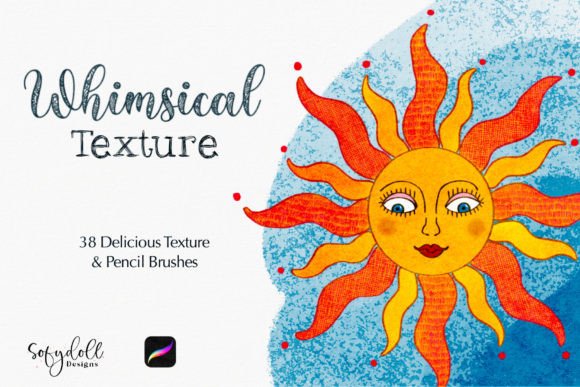
Bringing Hand-Drawn Charm to Digital Art with Whimsical Texture for Procreate
Digital illustration has come a long way from the sterile, vector-perfect lines of early graphic design software. Today, artists and creators crave the warmth, imperfection, and tactile feel of traditional media. This is where Whimsical Texture for Procreate steps in, bridging the gap between the convenience of digital tools and the organic soul of hand-crafted art. For anyone who has ever stared at a blank digital canvas feeling that something was missing—usually that gritty, paper-like resistance or the soft bleed of pencil on grain—this brush set offers a tangible solution.
The core promise of this collection is simple yet powerful: each brush was created with specific texture needs in mind. It is not just about adding noise to a flat color; it is about embedding character into every stroke. Whether you are designing fun characters for a children’s book or painting magical story art for a fantasy novel, the variety provided allows for deep customization. The ability to combine two or more brushes to create even more whimsical textured effects means you are not limited to a single look. You become the architect of your own aesthetic.
Why Texture Matters in Modern Digital Creation
In an era where AI-generated images and stock photos flood our feeds, authentic human touch has become a premium asset. Texture signals humanity. It tells the viewer that a person made this, with all the delightful inconsistencies that come with manual creation. Using Whimsical Texture for Procreate allows creators to inject this authenticity into their work without needing a physical studio.
Consider the psychological impact of texture. Smooth, glossy digital renders can sometimes feel cold or corporate. In contrast, artwork with visible pencil grain, canvas weave, or soft charcoal smudges feels approachable and nostalgic. For marketers and entrepreneurs, this distinction is crucial. A brand identity built on whimsical, textured illustrations often communicates values like creativity, care, and uniqueness. It stands out against the polished minimalism that dominates many industries.
Real-World Applications for Diverse Creators
The versatility of this brush set means it serves a wide array of users beyond just fine artists. Here is how different professionals and hobbyists can leverage these tools in their daily workflows.
Children’s Book Illustrators and Storytellers
This is perhaps the most natural fit. Children’s literature thrives on warmth and imagination. The 38 Pencil Texture Brushes included in the set allow illustrators to mimic the look of colored pencils, graphite, or crayons. When creating characters, these brushes help avoid the "uncanny valley" of overly smooth digital skin or fur. Instead, a character’s sweater can have a knitted feel, and the background can resemble watercolor paper. By layering a pencil texture over a base color, an illustrator can achieve a storybook quality that resonates with young readers and parents alike.
Brand Designers and Social Media Managers
Small business owners and freelancers often need to create social media graphics that stop the scroll. Standard templates can look generic. By incorporating the Canvas Texture or subtle pencil strokes into backgrounds, quotes, or product mockups, designers can create a cohesive, artisanal brand vibe. Imagine a coffee shop owner creating Instagram posts for their new seasonal blend. Using a textured background gives the post a rustic, handmade feel that aligns perfectly with the product’s artisanal nature. It transforms a simple digital flyer into something that feels crafted.
Educators and Course Creators
Teachers and online educators are constantly looking for ways to make their materials more engaging. Textured worksheets, presentation slides, and digital handouts can reduce visual fatigue and increase retention. The whimsical nature of these brushes makes learning materials feel less rigid and more inviting. An educator teaching creative writing might use these textures to design prompt cards that look like they were sketched in a notebook, fostering a sense of creativity and low-stakes experimentation among students.
Hobbyists and Journal Keepers
For the everyday user, digital journaling has become a popular outlet for mindfulness and organization. The Whimsical Texture for Procreate set enhances this experience by allowing users to decorate their digital planners with realistic-looking doodles, borders, and highlights. It turns the iPad into a true sketchbook replacement, offering the satisfaction of drawing without the mess of physical supplies.
Maximizing the Potential of the Brush Set
To get the most out of this resource, it is essential to understand how to layer and combine effects. The description notes that you can combine two or more brushes for an even more whimsical textured effect. This is where the magic happens. Start with a base layer using a broader texture, such as the included Canvas Texture, to establish the paper feel. Then, use the pencil brushes for line work and shading. Finally, add a second texture layer on top with a low opacity to unify the piece.
Experimentation is key. Do not be afraid to adjust the opacity, flow, and size dynamics of each brush. A heavy hand might overwhelm the delicate texture, while a light touch might let it shine. The goal is to find the balance where the texture supports the subject rather than distracting from it.
What to Consider Before You Start
While Whimsical Texture for Procreate is a powerful tool, it requires a shift in mindset for those used to clean digital vectors. Here are a few practical considerations:
- Device Compatibility: Ensure your iPad and Apple Pencil are calibrated correctly. Pressure sensitivity plays a huge role in how these textured brushes respond. A well-calibrated stylus will capture the nuances of the pencil grain far better than a finger or an older stylus.
- Layer Management: Textured brushes can be resource-intensive if used on too many layers. Keep your file organized. Use clipping masks to apply textures to specific shapes without affecting the entire canvas.
- Resolution Matters: If you plan to print your work, ensure your canvas resolution is high enough (typically 300 DPI) to preserve the detail of the textures. Low-resolution files may make the grain look pixelated rather than organic.
- Style Consistency: While having 38 options is great, sticking to a subset of 3–5 favorite brushes can help maintain a consistent style across a project. Jumping between vastly different textures can make a portfolio look disjointed.
Finding Your Unique Voice
Ultimately, tools like Whimsical Texture for Procreate are enablers. They remove the technical barriers to achieving a traditional look, allowing you to focus on composition, color, and storytelling. Whether you are a seasoned professional looking to refresh your style or a beginner eager to explore digital art, this set provides the building blocks for something special.
The value lies not just in the brushes themselves, but in the time they save. Recreating these textures manually using filters and overlays can take hours. Having them ready-to-use in a brush library streamlines the workflow, letting you iterate faster and create more. In a competitive creative landscape, efficiency combined with quality is a significant advantage.
As you begin to experiment, remember that the "whimsical" aspect is subjective. It might mean playful and bright for one artist, or moody and rough for another. The flexibility of this set allows for both interpretations. By understanding where and why to apply these textures, you can elevate your digital creations from simple images to engaging, tactile experiences that resonate with your audience.