Bunny Brush Stamps for Procreate
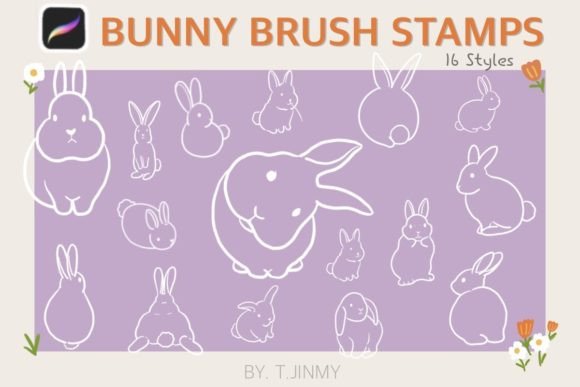
Digital illustration has evolved rapidly, offering artists tools that blend the tactile feel of traditional media with the limitless flexibility of software. Among these tools, stamp brushes have become a favorite for creators who want to speed up their workflow without sacrificing charm or personality. Bunny Brush Stamps represent a delightful addition to this category, specifically designed for users of the Procreate app on iPad. This collection features sixteen individual, hand-drawn stamps that capture the whimsical essence of bunnies in various poses and styles. Whether you are a professional illustrator looking to add quick decorative elements to a client project or a hobbyist creating digital journals, these brushes offer a versatile solution for enhancing your artwork.
Understanding the Value of Hand-Drawn Stamp Brushes
At their core, stamp brushes are pre-designed shapes that you can "stamp" onto your canvas with a single tap. Unlike standard drawing brushes that require you to sketch every line manually, stamp brushes allow you to place complex illustrations instantly. The Procreate bunny brush stamps included in this set are not generic clipart; they are hand-drawn directly within Procreate, ensuring that each stamp retains the organic, imperfect lines that give digital art a human touch. This authenticity is crucial for maintaining a cohesive aesthetic in your projects.
The primary appeal of this specific set lies in its versatility. With sixteen unique designs, you are not limited to a single pose or expression. You can mix and match these stamps to create scenes, patterns, or standalone characters. Because they are vector-like in their scalability, you can resize them from tiny accents to large focal points without losing quality. Furthermore, the ability to adjust color, opacity, and blending modes means that each stamp can be customized to fit the mood and palette of your current project. This level of control transforms a simple stamp into a dynamic design element.
Practical Applications for Creators and Businesses
The utility of Bunny Brush Stamps extends far beyond casual doodling. For small business owners and entrepreneurs, particularly those in the stationery, greeting card, or children’s book industries, these brushes can significantly reduce production time. Imagine designing a spring-themed invitation or a baby shower announcement. Instead of drawing a rabbit from scratch, you can select a suitable stamp from the collection, resize it, and adjust its color to match your brand guidelines. This efficiency allows you to focus more on layout and typography, which are often the deciding factors in professional design.
Educators and content creators also find immense value in such tools. Teachers creating digital worksheets or interactive lessons for young students can use these friendly bunny illustrations to make learning materials more engaging. Bloggers and social media managers can incorporate these stamps into their graphics to add a playful touch to posts, especially during holidays like Easter or throughout the spring season. The consistent style of the sixteen stamps ensures that your visual content remains coherent, reinforcing your personal or brand identity.
For digital journalers and scrapbookers, these brushes are a game-changer. Digital planning often involves decorating pages with stickers and drawings. Using Procreate bunny brush stamps allows you to create custom stickers that look hand-made but take seconds to place. You can layer them with other elements, change their opacity to create depth, or duplicate them to form borders and frames. This creative freedom encourages experimentation, allowing users to develop a unique visual language for their journals.
Technical Requirements and Compatibility
Before purchasing or downloading any digital brush set, it is essential to understand the technical requirements. Bunny Brush Stamps are exclusively designed for the Procreate app. This means you must have an iPad and the Procreate application installed to use them. Additionally, while you can navigate the app with your finger, using an Apple Pencil or a compatible pressure-sensitive stylus is highly recommended for the best experience, particularly when adjusting settings or combining stamps with hand-drawn elements.
It is crucial to note that these brushes do not work in Photoshop, Clip Studio Paint, Affinity Designer, or any other graphic design software. They are formatted specifically for Procreate’s brush engine. Attempting to import them into other applications will result in errors or unsupported file types. This limitation is not a drawback but rather a specialization that ensures optimal performance and quality within the Procreate ecosystem. If you are a multi-platform user, ensure that your workflow for this specific project is centered around your iPad.
How to Install and Use Your Bunny Brushes
Getting started with your new brushes is straightforward, but following the correct steps ensures a smooth installation process. When you purchase or download the set, you will receive a single ZIP file containing the sixteen bunny brush stamps and associated swatches. Here is a practical guide to getting them into your library:
- Unzip the File: Before attempting to import, ensure you have unzipped the downloaded file. Most iPads can handle this directly in the Files app. Tap the ZIP file to extract its contents.
- Locate the Files: Open the folder where you saved the downloaded files. You should see the brush set file (usually ending in .brushset) and potentially separate swatch files.
- Import to Procreate: Tap and hold the brush set file with your finger or Apple Pencil. A menu will appear; select “Share.”
- Select Procreate: In the share sheet, look for the “Open in Procreate” option. If you do not see it immediately, scroll through the app icons or click on “More” to find it. Tap it to initiate the import.
- Verify Installation: Open Procreate and start a new canvas or open an existing project. Tap the brush icon in the top right corner. Scroll through your brush library to find the new set. You should also check your palettes if swatches were included.
Once installed, using the stamps is intuitive. Select the brush from your library, choose your desired color from the disk, and tap anywhere on the canvas to place the bunny. You can then use the transform tool to resize, rotate, or flip the stamp. Experiment with different blending modes in the layers panel to see how the stamps interact with backgrounds and other elements. Lowering the opacity can create subtle, ghostly effects, while vibrant colors make the bunnies pop.
Maximizing Creativity with Customization
The true power of Bunny Brush Stamps lies in customization. Do not feel bound to use the stamps exactly as they appear. Change their hue to match a sunset palette, reduce opacity to create background patterns, or combine multiple stamps to tell a story. For instance, you might layer a sitting bunny with a jumping one to create a sense of movement. You can also draw over the stamps with standard Procreate brushes to add details like shadows, highlights, or accessories, effectively turning a stamp into a unique illustration.
Remember that these tools are meant to aid your creativity, not replace it. By integrating these hand-drawn elements into your workflow, you save time on repetitive tasks, allowing you to devote more energy to composition, storytelling, and artistic expression. Whether you are designing for commercial clients or personal enjoyment, these sixteen stamps offer a charming, efficient, and flexible resource for your digital art journey.