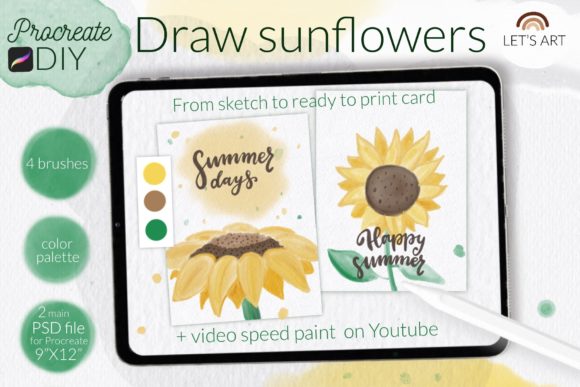
Paint Sunflowers: DIY Procreate Watercolor Kit
There is a distinct, quiet joy in watching digital pigment bleed across a virtual screen. For many creators, the gap between traditional media and digital tools can feel wide, but DIY Procreate Watercolor. Sunflowers bridges that divide with elegant simplicity. This isn’t just another brush pack; it is a curated experience designed to help you master the unpredictable beauty of watercolor without the mess, cost, or permanence of physical paint.
Whether you are a seasoned illustrator looking to streamline your workflow or a hobbyist eager to create heartfelt greeting cards, this kit offers a structured yet flexible path to artistic expression. By combining high-resolution textures, custom-engineered brushes, and step-by-step guidance, it transforms the iPad into a responsive, tactile studio.
The Anatomy of a Digital Watercolor Studio
What sets the DIY Procreate Watercolor. Sunflowers collection apart is its holistic approach. Most digital assets provide tools but lack context. This kit provides both the instruments and the instruction manual. At its core, the package includes two PSD files formatted at 9x12 inches and 300 DPI. These files serve a dual purpose: they act as fully layered canvases for drawing directly in Procreate, or they function as sophisticated coloring pages with authentic watercolor paper background textures.
The inclusion of a reference image within the file structure is a subtle but powerful feature. It allows artists to toggle between inspiration and creation without leaving the app, maintaining flow state. Furthermore, the kit comes with a dedicated color swatch palette. Instead of wasting time mixing hues to find the perfect golden yellow or deep earthy brown, users can instantly access a harmonized range of tones specifically calibrated for floral compositions.
Brushes That Mimic Reality
The true magic lies in the four custom brushes included in the set. Each tool has been engineered to replicate specific physical behaviors:
- Honey Watercolor Brush: This is the star of the show. It mimics the viscosity and transparency of wet-on-wet techniques, allowing colors to bloom and blend naturally.
- Lettering Smooth Brush: Ideal for adding handwritten notes, quotes, or signatures to your cards, providing a clean contrast to the organic flower petals.
- Background Tone Brush: Perfect for laying down washes that set the mood without overpowering the main subject.
- Soft Pencil: Essential for sketching initial outlines and adding fine details that require precision rather than fluidity.
These tools work in concert to create a user experience that feels less like "drawing on glass" and more like painting on textured cotton paper. The digital grain responds to pressure and tilt, offering a level of control that satisfies professional standards while remaining accessible to beginners.
Practical Applications for Creators and Entrepreneurs
The versatility of DIY Procreate Watercolor. Sunflowers extends far beyond personal enjoyment. In today’s digital-first economy, unique visual assets are currency. Here is how different professionals can leverage this kit:
Greeting Card Design and Print-on-Demand
For entrepreneurs running print-on-demand businesses, speed and quality are paramount. The pre-sized 9x12 canvas at 300 DPI ensures that your creations are print-ready immediately. You can design a series of sunflower-themed cards for birthdays, thank-you notes, or seasonal greetings. The high-resolution output means these designs can be scaled for larger prints, such as wall art or tote bags, without losing clarity.
Social Media Engagement
Content creators know that authentic, handcrafted visuals stop the scroll. Using the hashtag letsart_Procreate_DIY on Instagram not only categorizes your work but connects you with a community of like-minded artists. Sharing time-lapse videos of your process—facilitated by the included video tutorials—can significantly boost engagement. Audiences love seeing the "behind-the-scenes" transformation from a blank canvas to a vibrant bouquet.
Educational Workshops and Therapy
Educators and art therapists can use this kit as a teaching aid. The step-by-step JPG guides and YouTube video tutorials provide a scaffolded learning experience. Students can follow along at their own pace, reducing the anxiety often associated with starting a new piece. The forgiving nature of digital watercolor allows for endless experimentation, making it an excellent tool for building confidence in novice artists.
Mastering the Workflow: From Setup to Share
Getting started with DIY Procreate Watercolor. Sunflowers is straightforward, but attention to detail during installation ensures the best experience. The kit includes two video tutorials on YouTube, which are invaluable for visual learners. However, understanding the technical setup is crucial for smooth operation.
For users with Procreate version 4.0 or earlier, or those using older iPad models, the installation process requires a specific approach. The brushset file format may not be compatible with legacy versions. In these cases, you should download the individual .brush files to your iPad’s folder. Open Procreate, navigate to the Brush Library, and import each file manually. This method ensures that even users with older hardware can access the full range of textures and capabilities.
Once installed, the workflow is intuitive. Start by using the Soft Pencil to sketch your sunflower composition lightly. Refer to the included reference image for structural accuracy. Next, switch to the Background Tone Brush to lay down a subtle wash, establishing the light source and atmosphere. Use the Honey Watercolor Brush to build up the petals, layering colors to create depth and translucency. Finally, add text or fine details with the Lettering Smooth Brush.
Why This Kit Matters for Your Creative Practice
In a market saturated with generic digital assets, DIY Procreate Watercolor. Sunflowers stands out because it respects the user’s time and creative intent. It eliminates the friction of setup and the guesswork of color theory. By providing a cohesive ecosystem of brushes, palettes, and templates, it allows you to focus on what matters most: the act of creation.
The benefits are tangible. You save hours on troubleshooting brush settings or searching for compatible color palettes. You gain the ability to produce professional-grade artwork that resonates emotionally with viewers. Whether you are sending a personalized email card to a client or posting a new design to your portfolio, the quality of the output reflects well on your brand.
Moreover, the kit encourages iterative learning. The combination of video tutorials and static guides means you can revisit techniques whenever you hit a plateau. This supports long-term skill development, turning a single purchase into a lasting educational resource.
Final Thoughts on Digital Botanicals
Art is communication, and watercolor is a language of softness, warmth, and organic beauty. DIY Procreate Watercolor. Sunflowers gives you the vocabulary to speak that language fluently in a digital space. It is a tool for marketers seeking authenticity, for educators fostering creativity, and for individuals finding peace in the stroke of a brush.
As you begin your journey with this kit, remember that the goal is not perfection, but expression. Use the provided resources, experiment with the brushes, and share your results. Happy drawing, and may your digital sunflowers always find the light.