Design Your Own Christmas Stockings Advent Calendar
The holiday season brings a unique pressure for creators. Whether you are a digital artist, a social media manager, or a small business owner, the demand for fresh, festive content spikes in December. Audiences crave warmth and nostalgia, but producing high-quality seasonal graphics from scratch can be time-consuming. This is where a specialized tool like the Christmas Stockings Advent Calendar kit for Procreate becomes invaluable. It is not just a collection of clip art; it is a streamlined workflow solution designed to help you build personalized advent calendars quickly without sacrificing artistic integrity.
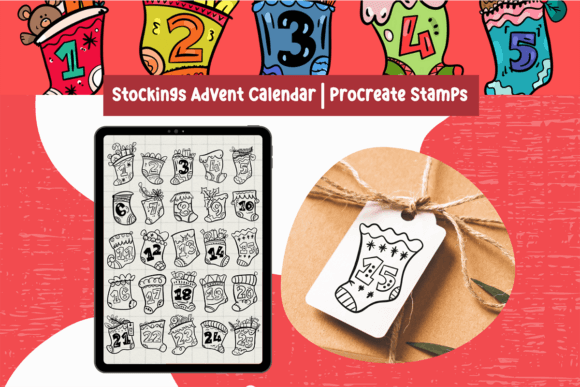
Digital planning and content creation have evolved. We no longer need to rely solely on static, pre-made templates that limit our creative freedom. Instead, we can use flexible assets that allow for complete customization. This specific set includes 26 cute Christmas stocking stamps, giving you enough variety to cover the entire advent period plus a few extras for error correction or bonus content. By integrating these brushes into your workflow, you bridge the gap between professional efficiency and handcrafted charm.
Why Digital Stamps Beat Static Templates
Traditional graphic design often involves wrestling with rigid layers and fixed elements. If a client wants a stocking moved three pixels to the left or changed from red to green, you might find yourself redoing significant work. The Christmas Stockings Advent Calendar brushes solve this by offering modularity. Each stocking is a stamp, meaning it behaves like a dynamic object within Procreate. You retain full control over placement, scale, and coloration.
The primary strength of this approach lies in its adaptability. Because the brushes are not pressure-sensitive, they render consistently every time you tap the screen. This predictability is crucial when designing grid-based layouts like advent calendars, where uniformity and alignment matter. You do not need to worry about varying line weights or opacity fluctuations caused by hand tremors or stylus pressure. The result is a clean, cohesive look that appears professionally curated, even if you assembled it in minutes.
Furthermore, the inclusion of a .swatches file ensures color harmony. Holiday palettes can easily become cluttered or clashing if not managed carefully. Having a pre-configured set of colors that complement the stocking designs allows you to maintain a consistent brand aesthetic throughout your project. This attention to detail elevates the final output from a simple DIY craft to a polished commercial asset.
Practical Applications for Creators and Businesses
The utility of these Procreate brushes extends far beyond personal holiday cards. For entrepreneurs and marketers, the Christmas Stockings Advent Calendar offers a versatile foundation for various campaigns. Consider the following real-world applications:
- Social Media Engagement: Create daily Instagram Stories or posts where followers "unlock" a discount code or a tip behind each stocking. The visual consistency keeps your feed organized and aesthetically pleasing during the chaotic holiday posting schedule.
- Email Marketing Headers: Design unique headers for your December newsletter series. A custom advent calendar graphic can increase open rates by adding a element of surprise and interactivity to your emails.
- Educational Content: Teachers and educators can use these stamps to create interactive learning activities. For example, each stocking could reveal a vocabulary word, a math problem, or a historical fact related to winter traditions, making learning fun and visually engaging for students.
- Digital Planners and Journals: If you sell digital planners, incorporating an advent calendar page adds significant value to your product. Users love customizable elements that allow them to track their holiday preparations, gift buying, or daily gratitude practices.
For freelancers, speed is money. Being able to generate a high-quality advent calendar graphic in under an hour allows you to take on more clients or dedicate more time to other aspects of your business. The ease of use means you do not need advanced illustration skills to produce something that looks hand-drawn and authentic.
Technical Ease and Accessibility
One of the most appealing aspects of this toolkit is its low barrier to entry. You do not need an expensive Apple Pencil to achieve great results. The brushes are designed to work seamlessly with third-party styluses or even your finger. This accessibility makes it ideal for creators who prefer tactile interaction or those who are just starting their digital art journey. The lack of pressure sensitivity simplifies the learning curve, allowing you to focus on composition and color rather than technical brush settings.
Installation is straightforward. After downloading the file through your web browser, you simply import it into Procreate. The process is intuitive, ensuring that you can start creating almost immediately. This frictionless setup is essential for professionals who need to jump into projects without troubleshooting technical issues. The compatibility is strictly with the Procreate app, which remains the industry standard for iPad-based digital illustration, ensuring stability and performance.
Customization for Brand Consistency
While the default designs are charming, their true power lies in customization. You can adjust the colors, opacity, and size of each brush to match your specific brand guidelines. If your brand uses a minimalist black-and-white palette, you can strip the stockings down to monochrome outlines. If you prefer a vibrant, eclectic look, you can experiment with bold, non-traditional colors like teal and magenta. This flexibility ensures that your Christmas Stockings Advent Calendar does not look generic but instead feels like an intentional extension of your visual identity.
Opacity adjustments allow for layering effects. You can create depth by overlapping stockings with varying transparency, adding a subtle, whimsical texture to your background. This technique is particularly effective for creating digital wallpapers or printable posters where visual interest needs to be balanced with readability.
Maximizing Value in Your Workflow
To get the most out of this digital asset, consider planning your layout before you begin stamping. Sketch a rough grid in Procreate to determine where each stocking will sit. This pre-planning prevents overcrowding and ensures a balanced composition. Use the swatches file to test different color combinations early in the process. It is easier to adjust your palette at the beginning than to recolor twenty-six individual elements later.
Also, think about the end user's experience. If you are creating an interactive digital advent calendar, ensure that the numbers or reveals inside the stockings are legible. The cute design of the stockings should enhance, not obscure, the content you are sharing. Clear communication combined with attractive visuals leads to higher engagement and better user satisfaction.
In a digital landscape saturated with generic holiday graphics, having tools that allow for quick yet personalized creation is a competitive advantage. The Christmas Stockings Advent Calendar brushes provide that edge. They enable you to produce content that feels personal, warm, and professionally executed, all while respecting your time and creative energy. Whether you are building a brand, teaching a class, or simply sharing joy with friends, these tools empower you to create meaningful holiday experiences with ease.